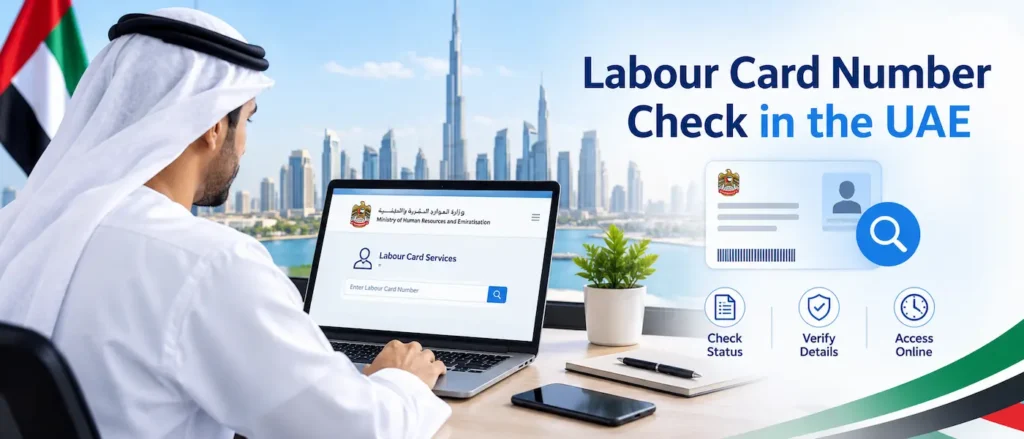
Every person working in the UAE, whether based in Dubai, Abu Dhabi, Sharjah or one of the northern emirates, ends up depending on a labour card number sooner or later. It sits quietly on official paperwork until a bank asks for it, a visa renewal depends on it, or a new employer’s HR team needs to confirm past employment. For most residents, this short string of digits works like an employment fingerprint, tied directly to records kept by the Ministry of Human Resources and Emiratisation, widely known by its short form, MOHRE.
Many employees only realise they never wrote this number down at the worst possible moment, usually while standing at a typing centre counter or filling an online form that suddenly demands a figure nobody memorised. This guide lays out the official, government-approved ways to check a labour card number in the UAE, explains what the number actually represents, and answers the questions that come up most often among private sector employees across the country.
What Is a Labour Card Number in the UAE?
A labour card, sometimes called a work permit, is issued by MOHRE for private sector staff working under a mainland company, or by the relevant free zone authority for employees based inside a free zone. It records who a person works for, what role they hold, and the period their employment arrangement has been approved to run. The labour card number is simply the unique identifier attached to that specific work permit record.
It is worth separating this from other identifiers residents carry around, since confusing one for another is the single biggest reason online enquiries fail on the first attempt. The labour card number is not the same as a passport number, an Emirates ID number, or a visa file number, even though all of these details sit inside the same MOHRE and Federal Authority for Identity, Citizenship, Customs and Ports Security records, and get cross-checked automatically whenever a query is raised. For a closer look at how the national identity system fits into this picture, the Emirates national identity card entry on Wikipedia gives a useful overview of how the ID number connects to government services.
What Information Appears on a UAE Labour Card
| Detail | What It Shows |
| Labour Card Number | Unique identifier for the specific work permit record |
| Employee Full Name | As registered on the passport and Emirates ID |
| Employer Name | The sponsoring mainland company or free zone establishment |
| Job Title / Occupation | The profession registered with MOHRE |
| Nationality | As recorded during the visa and permit process |
| Issue Date & Expiry Date | Validity period of the current work permit |
| Work Permit Number | Linked reference number tied to the permit application |
Why You Might Need to Check Your Labour Card Number
Requests for this number come up in more everyday situations than most residents expect:
- Opening a bank account or applying for a credit card, since banks verify employment through MOHRE records
- Renewing a residence visa or updating dependents on a family sponsorship file
- Resolving a salary dispute or checking Wage Protection System (WPS) payments
- Switching employers, where the new company’s PRO needs the previous work permit reference
- Applying for a driving licence, which is sometimes cross-checked against employment status
- Filing a complaint or enquiry directly through MOHRE’s channels
How to Check Your Labour Card Number in the UAE
There are five official routes to retrieve this number, and none of them require paying a third party. Each is explained below in the order most residents find fastest.
1. Through the MOHRE Website
- Open the official MOHRE enquiry portal https://inquiry.mohre.gov.ae/ and select the print electronic work permit information option.
- Enter the details requested, which usually include your work permit number, person code, transaction number and date of birth.
- Complete the verification step and submit the request.
- Your digital labour card, including the labour card number, appears on screen and can be downloaded or printed.
2. Through the MOHRE Smart App
- Install the MOHRE UAE app from the App Store or Google Play.
- Sign in using UAE Pass for the fastest verification.
- Open the Employee section from the home screen.
- Select your work permit profile to view the labour card number, issue date and expiry date.
3. Using UAE Pass
- Log in to the UAE Pass app with your Emirates ID and registered mobile number.
- Navigate to the Ministry of Human Resources and Emiratisation section and select Labour Card.
- Confirm the request to access the document, then wait for the notification that it is ready.
- Open the Documents section and tap Labour Card to view your number and full employment details.
Residents who have not set up this login yet may find it worth doing once and reusing it everywhere, since UAE Pass now unlocks dozens of other government checks beyond labour records. Our guide to using UAE Pass walks through the registration process step by step for anyone starting from scratch.
4. Visiting a Tas’heel Service Centre
- Locate a Tas’heel centre in your emirate; these operate as authorised MOHRE service points.
- Bring your Emirates ID or passport as identification.
- Ask staff to confirm your labour card number or provide a printed copy.
- Pay the small printing fee if you request a hard copy for official use.
5. Calling the MOHRE Contact Centre
- Dial the MOHRE hotline at 600590000 from anywhere in the UAE.
- Provide your Emirates ID number when asked to verify your identity.
- An agent reads out your current labour card details and flags any renewal that is due.
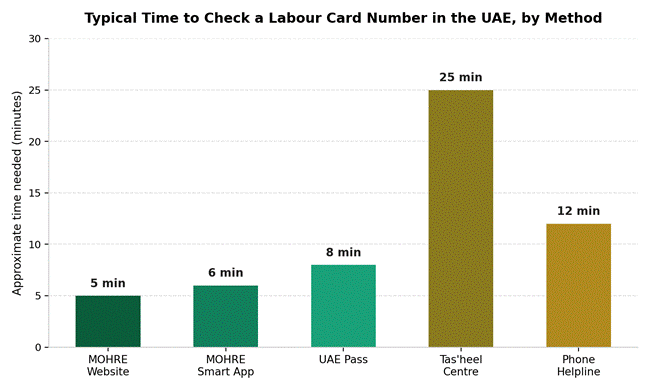
The chart below gives a rough sense of how long each method tends to take from start to finish, based on typical resident experience rather than an official published figure.
Comparing the Five Methods at a Glance
| Method | Needs Internet | Best For |
| MOHRE Website | Yes | Quick self-service checks from a laptop or desktop |
| MOHRE Smart App | Yes | Residents who prefer managing everything from a phone |
| UAE Pass | Yes | Anyone already using UAE Pass for other government services |
| Tas’heel Centre | No | Employees who want a printed copy or in-person help |
| Phone Helpline | No (call only) | Quick verbal confirmation without any app or login |
Labour Card, Work Permit and Emirates ID: What’s the Difference
These three documents get mixed up constantly, mostly because they are all issued by different bodies but referenced together in almost every government transaction.
| Document | Issued By | Main Purpose |
| Labour Card / Work Permit | MOHRE or free zone authority | Confirms legal employment with a specific employer |
| Emirates ID | Federal Authority for Identity, Citizenship, Customs and Ports Security | National identity document for residents and citizens |
| Residence Visa | General Directorate of Residency and Foreigners Affairs / ICP | Grants legal residency status in the UAE |
More background on how the ministry behind the labour card system operates is available on the Ministry of Human Resources and Emiratisation Wikipedia page, which covers its history and the reforms introduced to the Federal Labour Law in recent years.
What to Do If You Still Cannot Find Your Labour Card Number
If none of the five official methods above bring up a result, a few backup steps usually solve the problem:
- Check the printed or PDF copy of your labour contract, since the number is usually listed near the top
- Ask your company’s HR or PRO department, who keep this on file for every employee
- Visit a typing centre near you and ask them to run an enquiry using your Emirates ID
- Confirm your Emirates ID details are current, since an expired card often blocks UAE Pass logins
Losing track of one reference number is rarely an isolated event. Residents juggling a labour card, a mobile number, an Emirates ID and a business licence often find it easier to keep a short checklist of where each one lives. If a misplaced mobile number is part of the confusion, the piece on finding a lost Du number in the UAE covers seven practical ways to track it down.
Business owners checking employment records for staff often need to confirm company-side paperwork at the same time, including import and customs codes. The guide to HS code lookups for Dubai importers is a useful companion if that side of the business also needs attention.
Common Mistakes to Avoid During a Labour Card Check
- Entering the work permit number in the wrong format, including extra spaces or dashes
- Trying to log in to UAE Pass with an expired Emirates ID
- Confusing the labour card number with the residence visa file number
- Forgetting to update records after switching employers, which can delay future checks
- Sharing UAE Pass credentials with unofficial websites that promise faster results
Keeping personal reference numbers organised also matters beyond employment paperwork. Households managing discount programmes alongside government IDs sometimes cross-reference their Fazaa Card benefits and eligibility at the same time as renewing employment documents, simply because both tend to come up during the same admin errands.
Frequently Asked Questions
Is the labour card number the same as the work permit number?
Not always. The two are closely linked and often appear together on the same document, but MOHRE treats them as separate reference fields internally, so it helps to have both on hand when making an enquiry.
Can I check someone else’s labour card number?
Employers can check records for their registered staff through the company’s MOHRE account. Individuals cannot look up another person’s labour card details without proper authorisation, since this information is protected under UAE data rules.
Do free zone employees use the same MOHRE portal?
Free zone employees are usually registered under their specific free zone authority rather than mainland MOHRE, so the enquiry channel may differ slightly. Checking with the free zone’s own employee portal is often the quickest route in that case.
Is there a fee to check a labour card number?
Checking online through the MOHRE website, the smart app or UAE Pass is free. A small administrative fee may apply only if a printed copy is requested at a Tas’heel centre.
What happens if my labour card has expired?
An expired labour card usually means the employment contract needs renewal. The online enquiry will still show the number, but it will flag the expired status, and the employer typically needs to submit a renewal request through MOHRE.
Can I check my labour card status without an Emirates ID?
The Emirates ID or the equivalent identification number is required for almost every method described above, since it is the primary way MOHRE verifies identity before releasing employment details.
How long does the labour card number stay the same?
It generally stays linked to the same employment record for as long as that specific work permit remains active. A new number is usually issued when someone joins a new employer under a fresh permit.
Related Posts
- A Simple Guide to Using UAE Pass
- Du Number Check Code UAE: 7 Fast Ways to Find Your Mobile Number
- Fazaa Card UAE: Benefits, Eligibility & How to Apply
- HS Code Dubai: The Practical Guide Every Importer Needs Before Shipping
Disclaimer
This article is written for general informational purposes only and does not constitute legal, immigration, or employment advice. Procedures, fees, contact numbers, and portal steps referenced here can change at any time at the sole discretion of MOHRE, UAE Pass, and other relevant UAE government authorities. Readers should always confirm current requirements through the official MOHRE website, the MOHRE Smart App, UAE Pass, or an authorised Tas’heel service centre before relying on any step described in this guide. Arab Market Trends is not affiliated with MOHRE or any UAE government body and accepts no responsibility for outcomes arising from the use of this information.