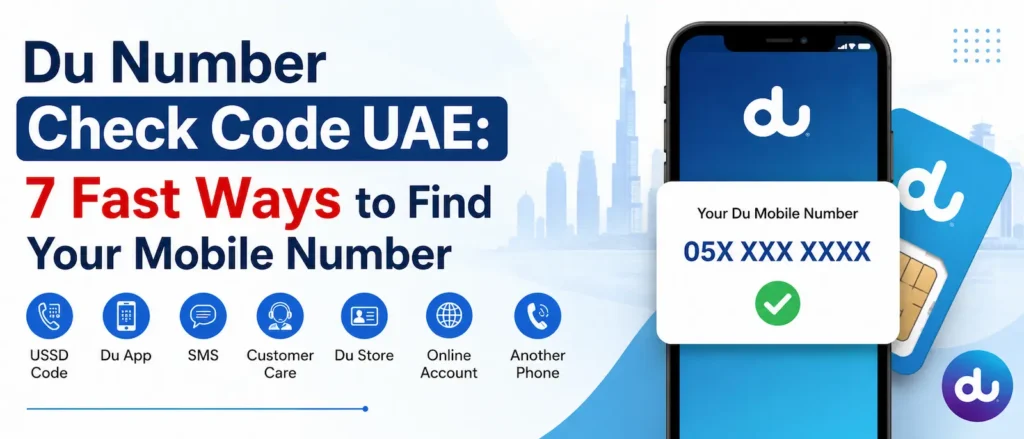
Losing track of your own Du mobile number happens more often than most people admit. You swap SIMs between an old phone and a spare one, you set up a fresh line for a parent or a domestic helper, or you simply go a few weeks without saying the number out loud to anyone. Then a delivery rider asks for it, a bank app wants an OTP sent to it, or a government form has a blank field for it, and your mind goes completely empty.
If you’ve landed here searching for a working du number check code, this guide covers every method Du subscribers across the UAE currently rely on, starting with the fastest and moving down to the ones you only need when the phone has no signal, no data, and no balance left.
None of the steps below need a technician or a trip to a service centre. Most residents solve this in under a minute using nothing more than the dial pad.
Why Knowing the DU Number Check Code Actually Matters
It’s easy to assume you’ll never forget your own number, right up until the moment you need to give it out and can’t. A working du number check code saves you from a handful of everyday headaches:
Topping up credit or sending balance to a friend or colleague
Registering on banking apps, delivery platforms, or government portals that verify identity through your mobile number
Filling out Emirates ID renewal forms, visa paperwork, or school registration documents that ask for a contact number
Confirming your own line after buying a second SIM for work or travel
Handing your number to someone quickly during an emergency
Whatever the reason, the fix takes seconds once you know which code or method to use.
The Fastest DU Number Check Code: *116#
For most Du prepaid and postpaid lines, the quickest route is a short USSD dial. It works with zero data connection and does not require any airtime balance, which makes it the default recommendation in almost every situation.
Steps to Check Your Number with the USSD Code
Open the dial pad on your phone, the same screen you use to make a regular call
Type *116# exactly as written, with the asterisk and the hash symbol
Press the green call button
A short pop-up or on-screen message will display your registered mobile number within a few seconds
If nothing appears immediately, wait five to ten seconds. USSD responses occasionally lag on congested networks, particularly during peak evening hours in busy areas.
Comparing the Methods: Which One Should You Use?
The table below lines up every method side by side so you can pick the one that suits your situation, whether you’re offline, out of credit, or simply prefer using an app.
Method
How It Works
Needs Internet?
Needs Balance?
USSD Code *116#
Dial from any keypad, number pops up on screen
No
No
Du App / My Account
Log in and view number on the dashboard
Yes
No
SMS Method
Send a keyword to a Du short code, get a reply
No
No
Phone Settings
Check under About Phone or Contacts
No
No
SIM Pack / Welcome SMS
Look at the plastic card or first SMS received
No
No
Customer Care
Call 155 and verify identity with an agent
No
No
Ask a Contact
Call or message someone, they read your number back
No
No
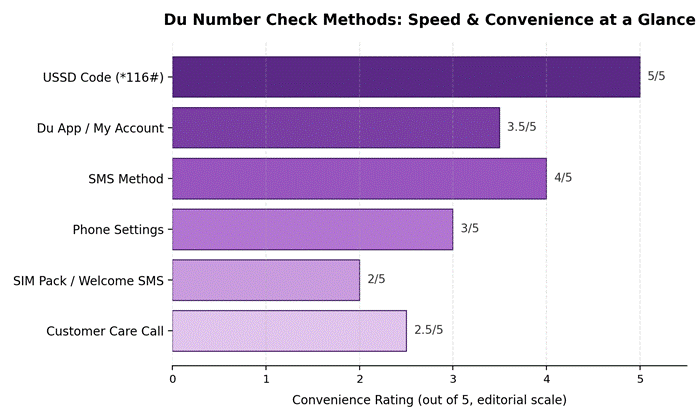
Not everyone reaches for a keypad first. Here’s a quick visual on how each option stacks up in terms of speed and overall convenience, based on how little setup each one needs.
Checking Your Number Through the Du App or Website
If you already manage your line digitally, the Du app (or the du.ae web portal) shows your number the moment you log in.
Open the Du app on your phone, or visit the official Du website on a browser
Sign in using your registered credentials, Emirates ID, or an OTP sent to your device
Your mobile number appears at the top of the account dashboard or under your profile section
This route is handy if you’re already inside the app to recharge, check your data usage, or pay a postpaid bill, since you get the number and your account details in the same place. It does need an internet connection to load, unlike the USSD method.
Retrieving Your Number Through SMS
Some Du lines support a short SMS command that triggers an automatic reply containing the registered number. Open your messaging app, type the keyword requested by the service (commonly a short word tied to your account), and send it to the designated short code. Within moments you’ll receive a text back listing your number. This is a useful fallback if USSD codes are behaving oddly on your specific handset or region, since SMS delivery runs on a different network layer.
Checking Your Phone’s Built-In Settings
Every smartphone stores the SIM’s registered number somewhere in its settings menu, provided it was saved during activation.
On an iPhone
Open Settings
Tap Phone
Look for My Number near the top of the screen
On an Android Device
Open Settings
Tap About Phone or About Device
Select Status or SIM Status
Find the entry labelled My Phone Number or SIM Number
This method fails occasionally on Android devices where the SIM number field was never populated. If that happens, fall back to the USSD code instead of troubleshooting the settings menu.
Looking at the SIM Card Packaging or Welcome Message
Every Du SIM ships in a small plastic wallet or card with the mobile number printed directly on it, sometimes as a sticker rather than printed text. If you kept the original packaging from when you first activated the line, flip it over and check the back panel carefully, since the digits are occasionally printed in small font alongside the ICCID number. Alternatively, search your SMS inbox for the original activation or welcome message Du sends the moment a new SIM goes live; that message almost always states the number in plain text.
Calling Du Customer Care
When every self-service option fails, Du’s support line can confirm the number tied to your account after a quick identity check.
Dial 155 free of charge from a Du line, or +971 4 390 5555 from another network
Choose your preferred language when prompted
Explain that you need to confirm your registered mobile number
Be ready to verify your identity using your Emirates ID number or passport details
This route takes longer than the others because of the verification step, so treat it as a last resort rather than a first choice.
The Simplest Fallback: Ask Someone to Call or Message You
If you’re near a friend, colleague, or family member, hand them your phone or ask them to note the number showing on their own screen when you call or text them. It costs nothing beyond a normal call or SMS and needs no codes, apps, or menus at all. It’s not elegant, but it works every single time.
Checking Your DU Number With No Balance Left
A common worry is whether these methods still work on a completely empty prepaid account. The good news is that most of them do not depend on airtime at all:
The USSD code *116# functions regardless of balance
Phone settings pull directly from the SIM, independent of credit
SIM packaging and welcome messages obviously don’t need any balance either
The one exception is the app method, which needs a working internet connection (WiFi counts) rather than airtime credit specifically.
Understanding UAE Mobile Prefixes
Once you’ve retrieved your number, it helps to recognise which operator it belongs to, especially if you’re juggling more than one SIM. The table below breaks down the common prefixes used across UAE telecom operators.
Prefix
Operator
Line Type
050 / 056
Etisalat by e&
Mobile
052 / 054 / 058
Du
Mobile
055
Virgin Mobile UAE (on Du network)
Mobile
057
Various data-only / IoT lines
Data
For a wider picture of how the two main networks compare on data packages and pricing, our separate breakdown of Etisalat’s UAE data plans is worth a look if you’re deciding between operators for a new line.
Verifying Who Owns a DU Number
Sometimes the question isn’t your own number but confirming who a particular number belongs to, for instance when buying a second-hand SIM or double-checking a contact before a transaction. Du itself does not hand out ownership details over the phone for privacy reasons, but UAE residents can use the Telecommunications and Digital Government Regulatory Authority’s Hesabati service through UAE Pass to see every line registered against their own Emirates ID. Ownership disputes involving someone else’s line generally require a police report or a formal request through the operator, since this kind of data is protected under UAE telecom privacy rules.
Common Problems and Quick Fixes
The USSD code shows nothing
Confirm the SIM is inserted correctly and the phone shows network bars. Restart the device and try again; USSD gateways occasionally time out during network congestion.
The app won’t log in
Double check the password or request a fresh OTP. Confirm mobile data or WiFi is actually active, since a silent connectivity drop is the most common cause of login failures.
SMS reply never arrives
Wait a couple of minutes before resending, and confirm you typed the exact keyword required rather than a variation of it.
Phone settings show a blank number field
This is a known quirk on some Android builds and doesn’t indicate a faulty SIM. Rely on the USSD method instead rather than trying to fix the settings entry.
Recharging Once You Have Your Number
With the number confirmed, topping up takes just a couple of steps, whether through the app, a physical retail counter, or an online banking portal.
Open the Du app or website, enter the number, and select a top-up amount
Pay using a bank card, Apple Pay, or a linked wallet
Alternatively, visit any authorised retail counter and pay in cash or by card
If you’d rather pay through your bank app directly, it helps to confirm your available balance first. Our guide on checking your Emirates NBD balance walks through every method available to UAE account holders before you attempt a recharge payment.
Never share your number, OTP, or account password with anyone claiming to help with a recharge or verification over the phone. Du staff will never ask for your OTP.
Managing Your Line and Home Network Together
Many households run a Du mobile line alongside a home broadband router from the same provider, which comes with its own separate settings panel entirely. If you need to adjust your WiFi password or check your router configuration while you’re at it, our guide to the 192.168.70.1 Du router admin panel covers the login process step by step.
Key Takeaways
The USSD code *116# is the fastest and most reliable du number check code, working without internet or balance
The Du app, SMS, phone settings, SIM packaging, and customer care all serve as reliable backups
Ownership verification for someone else’s number should go through official TDRA channels or a police report, never informal requests
Keep your welcome SMS and SIM packaging stored somewhere safe as a permanent backup record
Never share your number, OTP, or password with anyone claiming to assist with verification
Conclusion
Forgetting a mobile number is a small, ordinary inconvenience, and in the UAE it has a simple fix. Dial *116# for an instant answer, and keep the Du app, SMS shortcut, or your SIM packaging in mind as a backup for the rare occasion when USSD codes misbehave. Whichever method fits your situation, you’ll have your number confirmed within a minute, without needing a shop visit or a support call.
The main du number check code is *116#, dialled directly from the phone’s keypad. It displays your registered mobile number on screen within a few seconds and works without internet access or airtime balance.
How do I check my Du number without internet?
Use the USSD code *116#, check your phone’s settings under About Phone or SIM Status, or look at your SIM card packaging and original welcome SMS. None of these require an internet connection.
Why is my Du number not showing up?
Confirm the SIM is inserted correctly and the device has network signal. Restart your phone and retry the USSD code. If the app or SMS method fails, try phone settings or the SIM packaging as an alternative.
Can I check someone else’s Du number ownership?
Du does not disclose another person’s registered details over the phone for privacy reasons. UAE residents can check lines registered under their own Emirates ID through the TDRA’s Hesabati service via UAE Pass. Disputes involving another person’s line typically require a police report or a formal operator request.
Is it safe to share the du number check code with someone else?
The code itself is not sensitive, but never share the number that results from it alongside an OTP or account password. Scammers sometimes combine a known number with a phished OTP to access accounts.
Does checking my Du number cost anything?
No. USSD dialling, SMS retrieval, phone settings, and checking your SIM packaging are all free. Only a customer care call may incur standard call charges if dialled from a non-Du line.
This article is for general informational purposes only and reflects publicly available information at the time of writing. USSD codes, short codes, app features, and customer service procedures are set by Du (Emirates Integrated Telecommunications Company) and are subject to change without notice. Readers should confirm current steps directly through Du’s official app, website, or customer care before relying on any method described here. This content is not affiliated with, endorsed by, or sponsored by Du or any UAE telecom operator.